User Guide#
Run this guide
Import MagTrack#
To start import magtrack. Here we will also import a simulation and NumPy.
import magtrack
from magtrack.simulation import simulate_beads
import numpy as np
Simulating bead stacks#
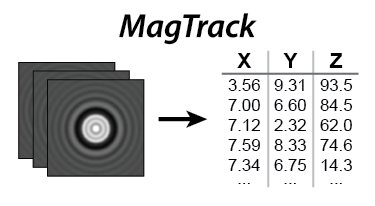
The magtrack.simulation module can synthesize bead image stacks for testing and benchmarking. The snippet below
matches generates a stack of 100 frames where the bead drifts laterally while oscillating
in the vertical direction:
n_frames = 100
roi = 64
nm_per_px = 100.0

x_true = np.linspace(-200, 200, n_frames)
y_true = 100.0 * np.sin(np.linspace(1, 6 * np.pi, n_frames))
z_true = np.zeros_like(x_true)
xyz_true = np.stack([x_true, y_true, z_true], axis=1)

stack = simulate_beads(xyz_true, size_px=roi, nm_per_px=nm_per_px)
The result stack is a three-dimensional NumPy array with shape (roi, roi, n_frames). Throughout the examples we
convert between pixels and nanometers using nm_per_px to compare the algorithms against the known truth.
Estimating lateral positions#
For a first-pass lateral estimate, use magtrack.center_of_mass(). The background keyword controls how the
intensity bias is removed before computing the centroid. "none" leaves the data unchanged, "mean" subtracts the
frame mean, and "median" subtracts the frame median for the most robust accuracy:
x_com_px, y_com_px = magtrack.center_of_mass(stack, background="median")

x_com_nm = x_com_px * nm_per_px
y_com_nm = y_com_px * nm_per_px
Because the simulated data provides the ground-truth positions, you can compute the per-frame localization error and plot it alongside the measured trajectories.
Refining XY positions#
MagTrack offers multiple refinement strategies after the coarse center-of-mass estimate. Auto-convolution narrows in on the peak intensity around the bead, and the sub-pixel variant increases accuracy with a localized curve fit:
x_ac_px, y_ac_px = magtrack.auto_conv(stack, x_com_px, y_com_px)
x_acsp_px, y_acsp_px = magtrack.auto_conv_sub_pixel(stack, x_com_px, y_com_px)

error_acsp_nm = np.sqrt((x_acsp_px * nm_per_px - x_true_nm)**2 +
                        (y_acsp_px * nm_per_px - y_true_nm)**2)
For even finer control, Quadrant Interpolation (QI) can be iterated. Starting from the same seed coordinates, refine the result multiple times to progressively reduce the residual error:
x_qi1_px, y_qi1_px = magtrack.qi(stack, x_com_px, y_com_px)
x_qi2_px, y_qi2_px = magtrack.qi(stack, x_qi1_px, y_qi1_px)
x_qi3_px, y_qi3_px = magtrack.qi(stack, x_qi2_px, y_qi2_px)
Each pass returns a new set of sub-pixel coordinates. Comparing the error traces from the center-of-mass, auto convolution, and QI routines highlights the accuracy/throughput trade-offs.
Working with radial profiles and axial lookup#
To recover axial motion, convert each frame into a radial intensity profile and compare it with a precomputed lookup
library (Z-LUT). Start by simulating a reference stack that scans through known z offsets and building the table of
profiles:
z_reference = np.arange(-10_000, 10_100, 100)
xyz_reference = np.column_stack([
    np.zeros_like(z_reference),
    np.zeros_like(z_reference),
    z_reference,
])
reference_stack = simulate_beads(xyz_reference, size_px=roi, nm_per_px=nm_per_px)

reference_profiles = magtrack.radial_profile(
    reference_stack,
    np.full(z_reference.shape, roi / 2, dtype=float),
    np.full(z_reference.shape, roi / 2, dtype=float),
)

zlut = np.vstack([z_reference, reference_profiles])
With zlut prepared, analyze a fresh recording by extracting its radial profiles and calling
magtrack.lookup_z() to obtain sub-frame axial positions:
eval_profiles = magtrack.radial_profile(
    stack,
    x_com_px,
    y_com_px,
)
z_fit = magtrack.lookup_z(eval_profiles, zlut)
Plotting z_fit against the simulated truth illustrates how closely the axial estimate tracks the bead.
Running the full pipeline#
The magtrack.stack_to_xyzp() convenience function wraps the lateral and axial steps. Provide a stack of bead images
and the Z-LUT, and it returns the lateral coordinates, axial positions, and fitted radial profiles in one call:
x_fit, y_fit, z_fit, profiles_fit = magtrack.stack_to_xyzp(stack, zlut=zlut)
This is the quickest path when you already have a reference lookup table and want to process experimental recordings.
Inspect profiles_fit to debug how well the observed profiles match the lookup data.
Accelerating with GPUs#
All MagTrack functions operate on either NumPy arrays (CPU) or CuPy arrays (GPU). To use the GPU, move the stack to device memory and call the same functions.
import cupy as cp

# Move stack to GPU
stack_gpu = cp.asarray(stack)

x_com_px_gpu, y_com_px_gpu = magtrack.center_of_mass(stack_gpu, background="median")

# Move values back to CPU
x_com_px = cp.asnumpy(x_com_px_gpu)
y_com_px = cp.asnumpy(y_com_px_gpu)